All work06 / 09

Client project · Fashion e-commerce

The Lilie

Editorial fashion, built around the path to purchase.

Visit the live e-commerce site
My contribution

Within the AGD team, I designed the e-commerce UX/UI across the homepage, categories, product listings, filters, product-detail flows, and responsive behavior.

Stage

Live e-commerce website

Timeline

Multi-page website design and launch

The problem

The website had to preserve an expressive fashion identity while making a broad catalog, variants, sizing, delivery, and purchase actions easy to understand.

What I delivered

A live multi-page fashion e-commerce website and original Figma system covering discovery through product selection.

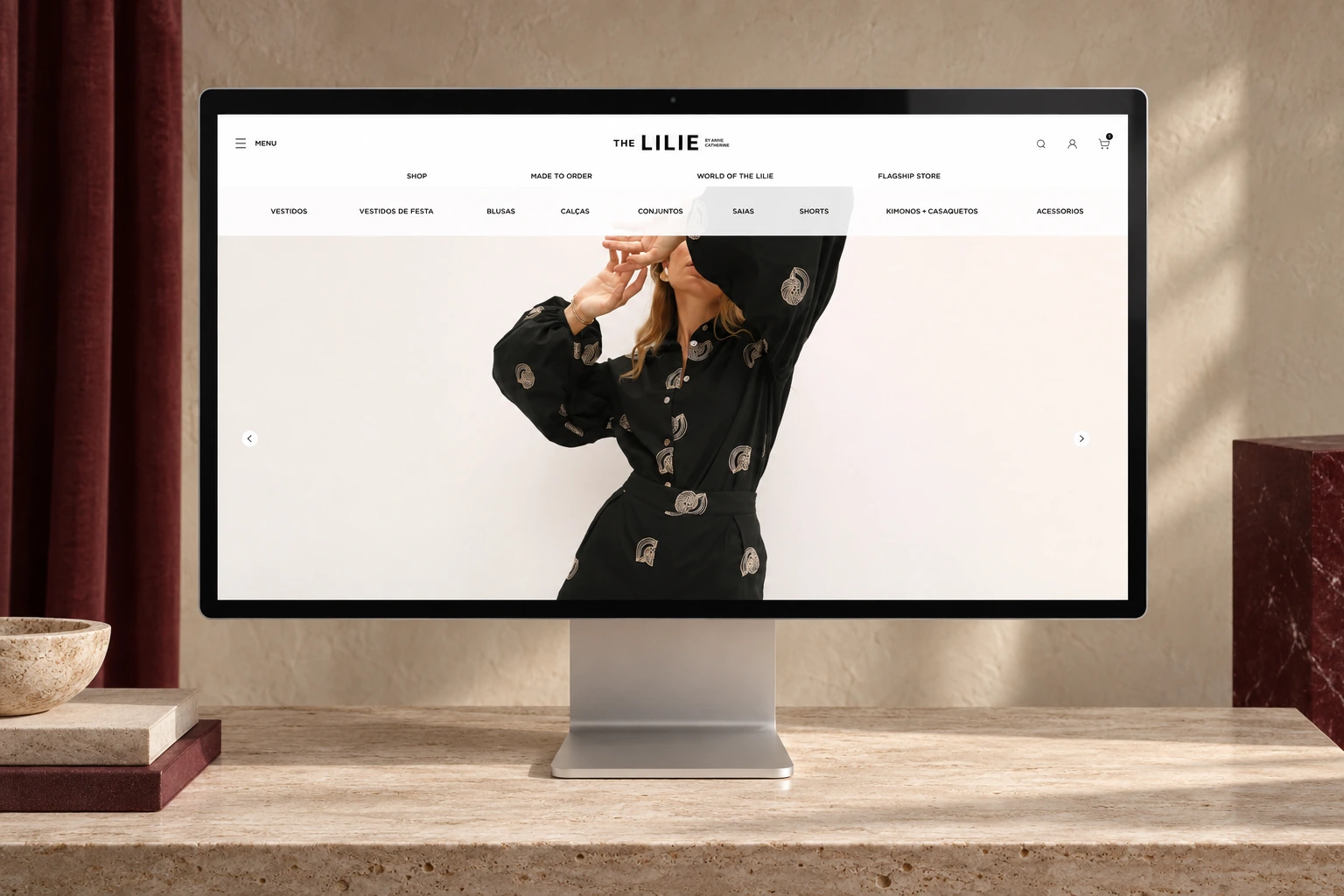
The Lilie fashion e-commerce homepage displayed on a Studio Display in a warm editorial fashion set

Original Figma designs in presentation mockups. The live commerce website may have evolved after handoff. Work created within the AGD team.

What shaped the experience.

Editorial modules and commerce components needed to share one visual system across a long, image-heavy responsive website.

01 / Design rationale

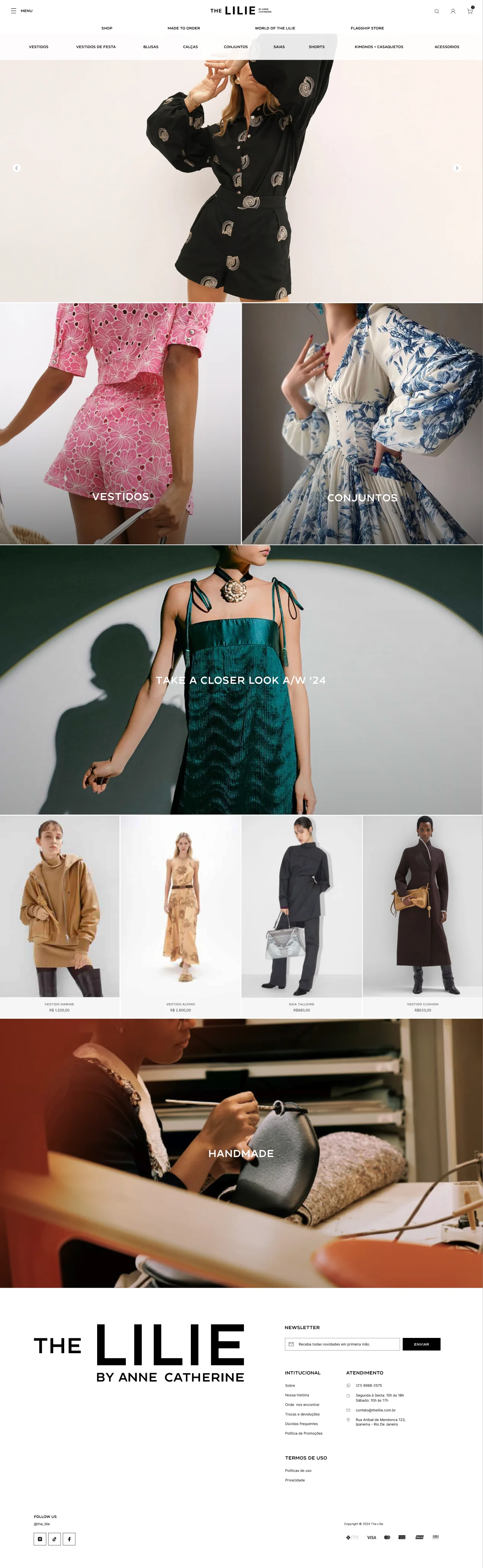
Turn brand imagery into navigable choices

Pair editorial collection imagery with direct category and product routes throughout the homepage.
Design detail — Turn brand imagery into navigable choicesExplore the original

Why this structure

Visitors can enter through the brand story and still understand where to browse or shop next.
02 / Design rationale

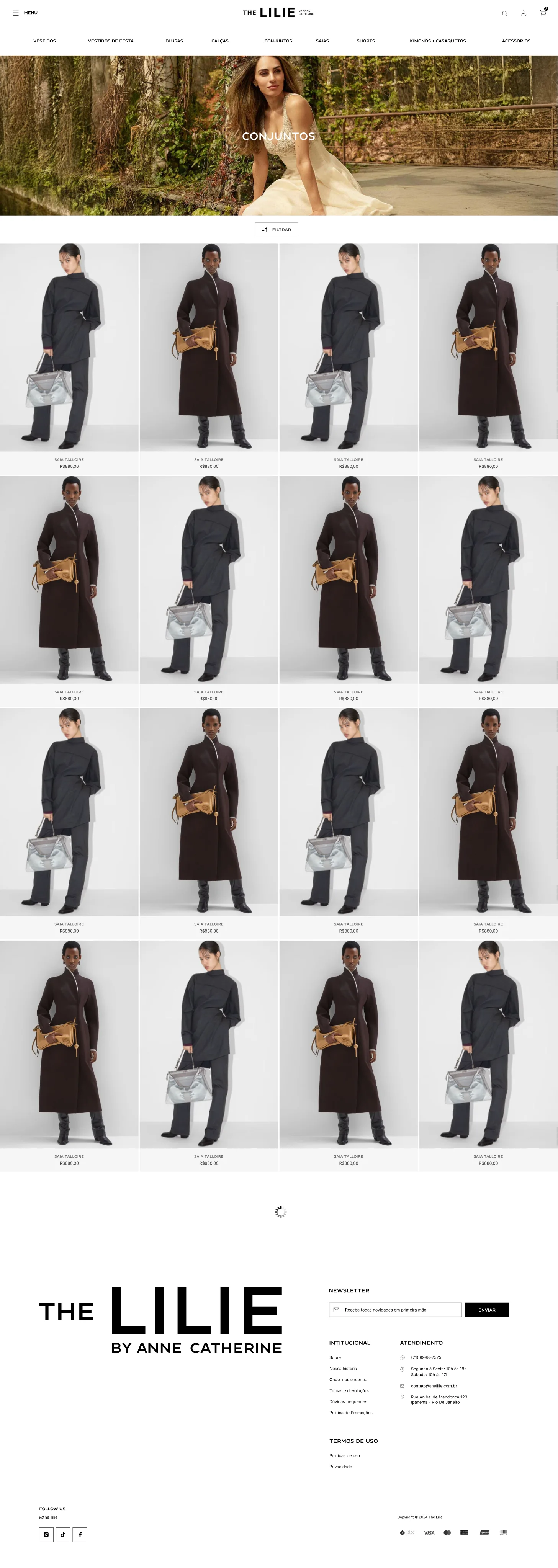
Use one clear rhythm for the assortment

Keep categories persistent, introduce filtering as a distinct action, and repeat a consistent four-column product card.

Design detail — Use one clear rhythm for the assortmentExplore the original

Why this structure

The structure makes a large catalog scannable while giving the campaign image space to set the category tone.

03 / Design rationale

Keep product and purchase context together

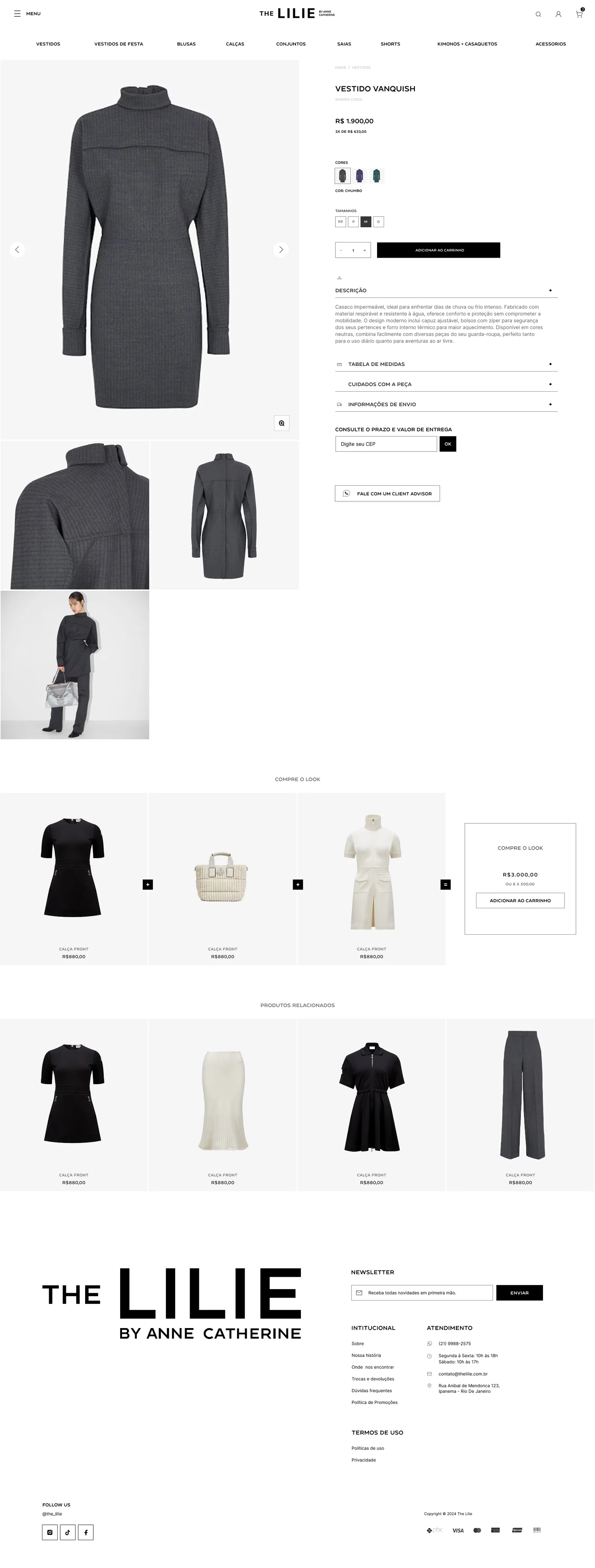
Place the gallery beside variants, sizing, quantity, delivery, care, measurements, and the add-to-cart action.

Design detail — Keep product and purchase context togetherExplore the original

Why this structure

The main questions required to choose a fashion product stay in one decision area, with deeper information available progressively.

04 / Design rationale

Continue discovery after the primary item

Use complete-the-look and related-product modules after the core product information.

Design detail — Continue discovery after the primary itemExplore the original

Why this structure

The modules extend the shopping journey through complementary pieces without interrupting the primary purchase decision.

The design, in detail.

Start with the world of the brand.

The home balances collection imagery, direct category routes, product discovery, and the handmade story. Commerce begins inside the editorial experience instead of replacing it.

Homepage · campaign opening, category entrances, collection story, products, and handmade content.Full screen
Homepage · campaign opening, category entrances, collection story, products, and handmade content.
Editorial modules and product cards further down the original homepage design.Full design
Editorial modules and product cards further down the original homepage design.
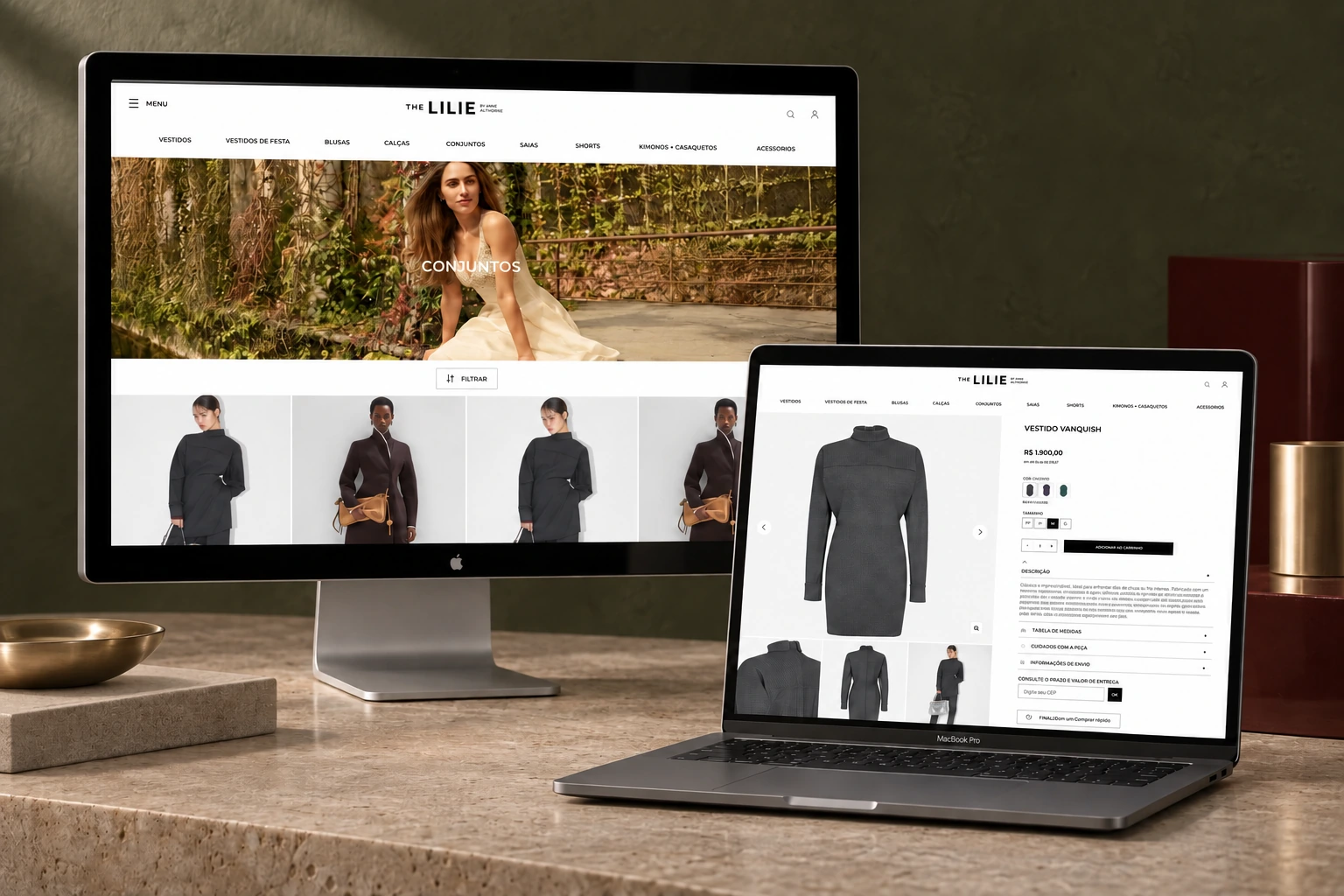
The Lilie category and product-detail designs displayed on a Studio Display and MacBook Pro in a dark olive fashion set.
Category discovery and product evaluation, presented with the original desktop designs.

Make a large catalog easy to scan.

Persistent product categories establish the assortment before the grid. A visual category opening, a dedicated filter action, and consistent product cards give browsing a predictable rhythm.

Category page · campaign image, filter entry point, and a four-column product grid.Full screen
Category page · campaign image, filter entry point, and a four-column product grid.

How the pieces connect.

A retrospective map based on the original Figma designs and the live website. The scenarios are illustrative usage cases, not research participants.

The LilieExperience map
01

Enter the brand

  • Campaign-led homepage
  • Collection and craft stories
  • Direct category entrances
02

Browse the catalog

  • Persistent categories
  • Collection or category opening
  • Filter entry point
  • Product grid
03

Evaluate a product

  • Image gallery
  • Price and installments
  • Color and size choices
  • Description and care
04

Make a purchase decision

  • Quantity
  • Add to cart
  • Delivery estimate
  • Client advisor
05

Continue discovery

  • Complete the look
  • Related products
  • Newsletter and service information

From campaign discovery to product selection

  1. 01

    Enter through a campaign

    See the current collection and the visual world of the brand.

  2. 02

    Choose a category

    Use a featured route or the persistent product navigation.

  3. 03

    Scan and filter

    Review the grid and narrow the assortment from the filter action.

  4. 04

    Open a product

    Inspect imagery, price, variants, size, and product information.

  5. 05

    Check delivery

    Use the postal-code field or client-advisor route when more support is needed.

  6. 06

    Add or keep exploring

    Add the selected product to cart or continue through the look and related items.

Illustrative scenario

Find a dress for an occasion

A visitor arrives through a campaign image and wants to compare dresses without browsing the entire assortment.

Task
Enter the dress category, refine the catalog, and assess one item before adding it to the cart.
Design response
Featured category routes, persistent navigation, filtering, consistent cards, and a structured PDP keep the sequence connected.

Illustrative scenario

Understand fit and delivery before buying

A visitor likes a piece but needs more confidence about size, care, and delivery timing.

Task
Review available variants and supporting information before making a purchase decision.
Design response
Size and color controls sit beside the main action, while measurements, garment care, shipping, delivery estimate, and client-advisor support remain in the same page.

Answer the purchase questions on the product page.

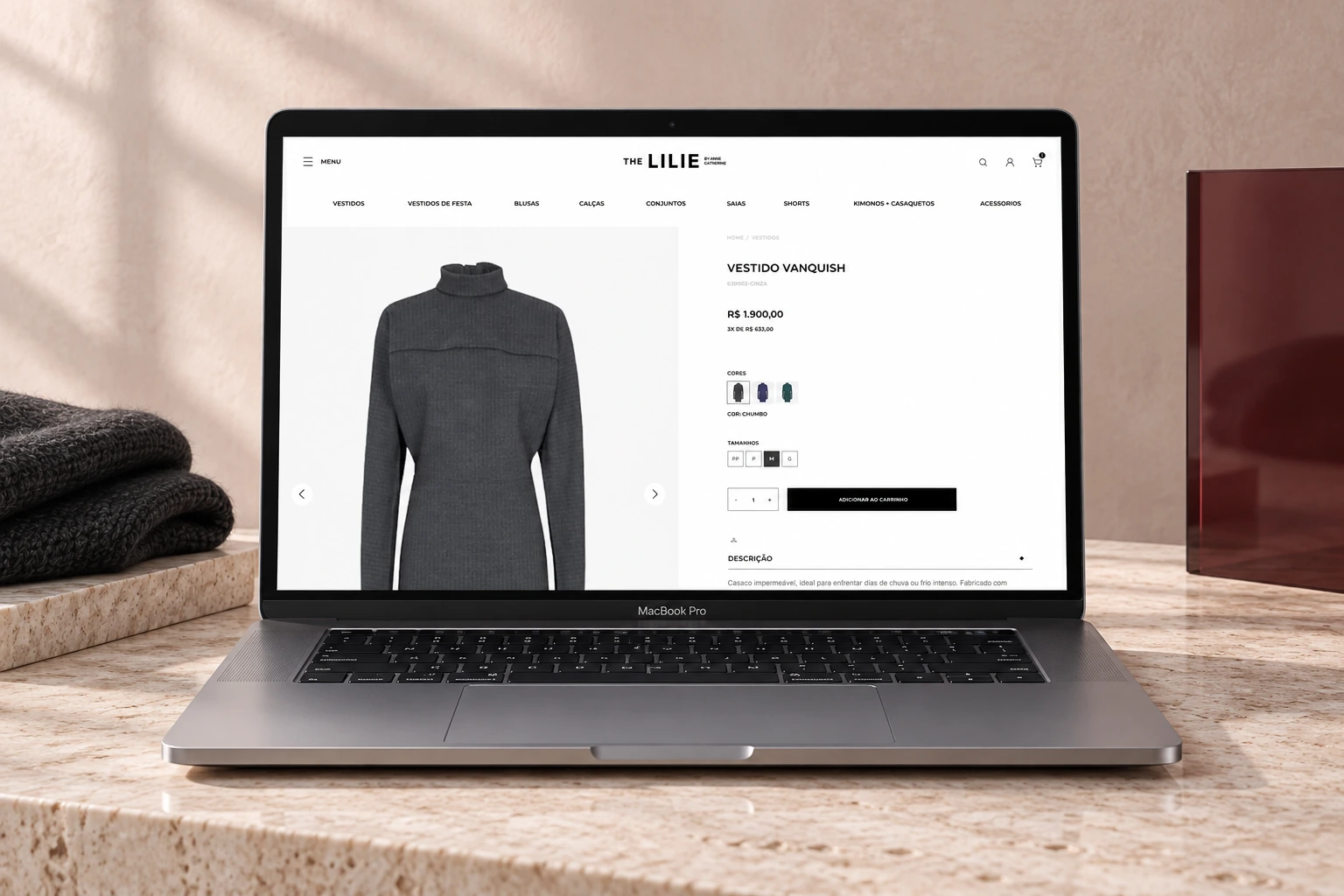
The PDP keeps imagery and decision-making side by side: price, installment information, colors, sizes, quantity, shipping, measurements, garment care, and access to a client advisor.

Product detail · gallery, variants, size choices, add-to-cart action, delivery, and supporting information.Full screen
Product detail · gallery, variants, size choices, add-to-cart action, delivery, and supporting information.
The Lilie product-detail page displayed on a MacBook Pro in a blush editorial studio set.
The product page brings imagery, variants, purchase actions, and supporting information into one decision space.

Continue the outfit, not just the item.

Complete-the-look and related-product modules extend discovery after the primary decision. They keep the product language consistent while offering clear paths into complementary pieces.

Product-page modules · complete the look, related products, newsletter, and service information.Full design
Product-page modules · complete the look, related products, newsletter, and service information.

Character, with a consistent structure.

#FFFFFF
#F5F5F5
#707070
#363636
#000000

Editorial commerce module

Full-bleed campaign imagery combines with concise category or collection labels to move from brand story into shopping.

Product card grid

Consistent imagery, naming, and price placement create a repeatable browsing rhythm across the assortment.

Progressive product information

The primary choices stay visible while measurements, care, shipping, and description use expandable rows.

Commerce continuation

Complete-the-look and related-product modules preserve the card language and offer clear routes to complementary items.

What took shape.

A live multi-page e-commerce experience spanning editorial home content, category navigation, product listings, filtering, product-detail decisions, delivery information, and cross-sell modules. The available material does not include verified conversion metrics.

ContextAGD client project
ScopeEditorial commerce + shopping flows
DeliveryLive responsive e-commerce website

Next design question

The next useful study would follow the full commerce funnel: category discovery, filter use, product-page comprehension, size confidence, add-to-cart, and checkout completion. Those signals would show whether the editorial experience supports purchase rather than only attracting attention.

Next projectGoody